How to Sequence Automation for Real Throughput
A GZP Guide
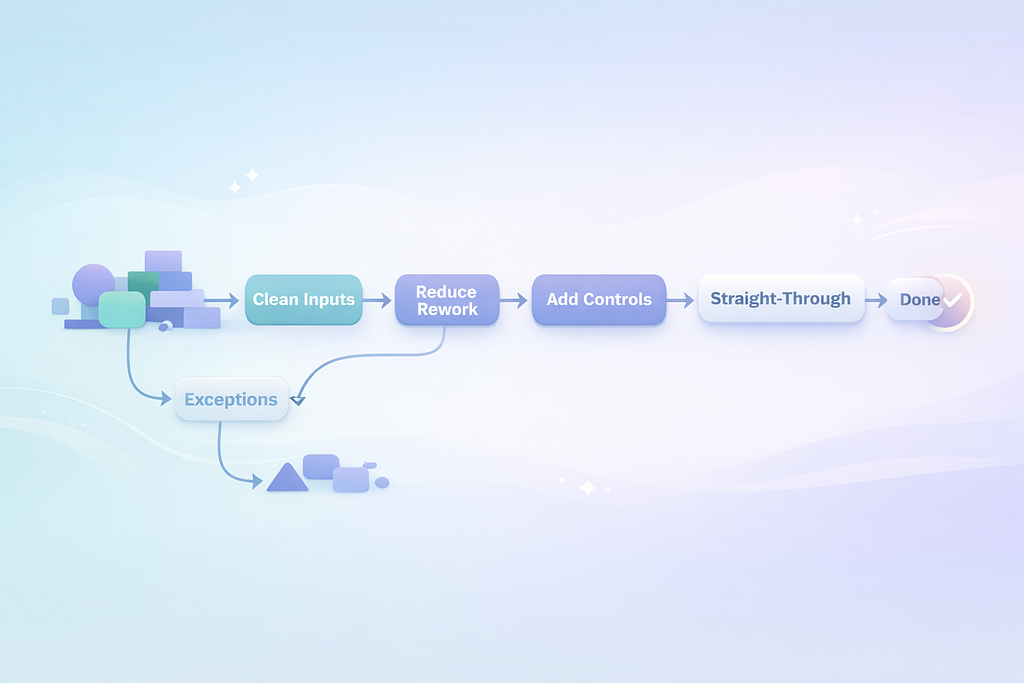
Build a pipeline: reduce rework first, then lock down controls, then improve customer-facing steps once the back end is steady.
Automation sequencing: which processes to automate first (and why order matters)
Automation fails more often from bad ordering than bad tooling.
Most teams begin with what is most visible. A big customer journey. A messy approval chain that leaders complain about. A backlog that feels urgent. The intent is good, but the sequence is backwards. You end up automating the chaos, which makes the chaos faster.
A better path starts with the boring work that breaks every day. The stuff that causes rework, exceptions, and escalations. When you automate that first, you reduce variation. Then the next processes become easier to automate. The program gets simpler over time, not harder.
This post is a field guide to sequencing. It is not a tool review. It is a way to decide what goes first, what waits, and how to prove the order is working.
Start with a map of work, not a list of ideas
- Pick first processes with repeatable steps, clean inputs, and a clear “done” state. Avoid judgment-heavy work early.
- Sequence to reduce variation first, then strengthen control points, then improve customer-facing steps once the back end is steady.
- Use a simple scoring model that combines volume, failure cost, variation, and dependency risk.
Most automation backlogs are a bucket of requests. “Can we automate this report.” “Can we automate that email.” “Can we auto-route these tickets.” The bucket grows because each request sounds reasonable on its own.
The problem is the bucket has no shape. Sequencing needs shape.
A useful map is not a glossy process diagram. It is a working view of how work moves: where it starts, where it waits, where it loops, and where it fails.
If you can answer four questions for a process, you can usually place it in the sequence:
- What triggers it.
- What inputs it needs, and where they come from.
- What “done” looks like in system terms.
- What happens when something is missing or wrong.
When those answers are fuzzy, automation turns into a guessing game. The build may still ship, but the exception queue will explode and the team will quietly add manual steps back in.
A small, honest map is enough. Ten steps. Real systems named. Real handoffs named. Real wait states named. You do not need a big transformation exercise. You need clarity on how work actually runs at 10 a.m. on a Tuesday.
Why order matters: automation compounds either value or debt
Automation changes the shape of work. That is the whole point. It also changes where the pain lives.
If you automate a downstream step while upstream inputs are messy, you create a faster reject loop. The work bounces back quicker, but it still bounces. People spend more time chasing and explaining. Your metrics look “automated,” but your staff feels busier.
If you automate an upstream cleanup step first, you remove noise. Downstream work becomes more predictable. The same automation approach that would have been brittle becomes stable.
This is why sequencing matters. You are not picking “the best process” in isolation. You are choosing the next constraint to remove.
Two patterns show up again and again:
- When teams start with high-visibility journeys, they hit identity, eligibility, pricing, and policy variation on day one. The automation becomes a patchwork of special cases. Every policy change becomes a fire drill.
- When teams start with rework loops and data corrections, they reduce the volume of weird cases. Later automations become smaller and easier to maintain.
The second pattern feels slower in week one and faster by month three. That is the trade.
A simple scoring model that forces the right conversations
You do not need a complex prioritization framework. You need one that makes tradeoffs explicit.
Here is a scoring model you can run in a spreadsheet in an hour. It gives you a ranked list that is usually “good enough” to start.
Score each candidate 1–5 on these factors:
- Volume (how often it happens)
- Time per case (manual minutes)
- Failure cost (money, compliance risk, customer impact)
- Variation (how many paths and exceptions)
- Input quality (how often data is missing or wrong)
- Dependency risk (how many upstream systems/teams must change)
Then compute:
Priority Score = (Volume × Time × Failure Cost) ÷ (Variation × Dependency Risk) × Input Quality
You can keep Input Quality as a multiplier where 1 = poor and 5 = clean. If you prefer, flip it and place it in the denominator. The point is the same: messy inputs push work later in the sequence unless fixing inputs is the automation itself.
This is not math for math’s sake. It forces clarity. Two candidates can look equally attractive until you admit one depends on three other systems and a quarterly policy council.
A common outcome of this scoring is that the “sexiest” idea drops down the list, and the “annoying daily cleanup” rises to the top. That is usually correct.
The first wave: automate rework and corrections where the rules are already settled
The best first automations do not require new policy debates. They rely on rules you already trust.
Look for work with these traits:
- The same correction happens every day.
- The inputs are known, even if they arrive in the wrong format.
- The output is a system update with a clear success signal.
- When it fails, the failure is easy to detect.
Examples that often fit:
- Fixing common data formatting issues before data enters a core system.
- Reconciling duplicates where matching rules are already defined.
- Routing and tagging work based on stable attributes.
- Generating standard confirmations once a system status changes.
Why these work early is simple. They reduce the noise that drives exceptions elsewhere. They also build credibility with the teams who live in the work. When the first automation removes a daily frustration, adoption takes care of itself.
There is also a maintenance advantage. Stable rules change less. That gives your program time to build operating discipline before you take on processes that change every month.
A practical test: if you cannot write the rule set in plain language in half a page, it is probably not first-wave work unless your first wave is explicitly “fix the data so we can automate later.”
The second wave: automate control points where mistakes are expensive
Once you have early wins, move to steps where the business pays for errors. Not in a vague way. In a ledger way. In a regulator way. In a repeat-call way.
These are often the control points:
- Identity and access checks
- Eligibility and entitlement checks
- Pricing and discount guardrails
- Refund and chargeback validations
- Audit logging and evidence capture
- Approval routing with hard limits
These steps often have more risk, but they can still be repeatable if you constrain the scope.
The sequencing trick is to automate the control before you automate the whole journey.
For example, instead of automating the full refund process, automate:
- validation of refund eligibility,
- retrieval of required evidence,
- creation of an audit record,
- and the guardrail that blocks out-of-policy refunds.
That reduces risk and reduces manual time even if a person still presses “submit.” It also makes later end-to-end automation easier because your guardrails are already defined and instrumented.
This is where governance starts to matter more. Controls need clear ownership. If the policy owner cannot commit to a stable rule set and a change process, you will be building on sand.
The third wave: customer-facing and judgment-heavy work, once the foundations are steady
Customer-facing steps are tempting because they are visible. They are also where variation lives.
Customers describe issues in messy language. Context is incomplete. Emotions run high. Products have edge cases. Policies have exceptions. If you start here, you end up building a maze.
This does not mean “never automate customer-facing work.” It means sequence it after you have reduced upstream noise and hardened your control points.
By the time you reach this wave, you should already have:
- cleaner customer and account data,
- reliable status signals from core systems,
- and guardrails that prevent high-cost mistakes.
Now you can automate customer-facing steps that are still repeatable, such as:
- proactive status updates tied to system events,
- simple case creation with correct routing and required fields,
- appointment scheduling when eligibility is already confirmed,
- document collection where “complete” can be validated.
You will still have exceptions. That is fine. The goal is that exceptions are smaller and clearer, so they can be handled quickly without blowing up the whole experience.
Build the runway first: data, exception paths, and “done” signals
The hidden work in automation is not the automation. It is the runway.
Three runway items decide whether automation reduces effort or shifts effort.
Clean inputs
If inputs are messy, you either fail more often or you build complicated rules to cope. The best move is often to automate input validation and normalization early, even if it feels unglamorous.
Exception paths
Every automated flow needs a defined “escape hatch.” Where does the work go when it cannot proceed. Who owns it. What information is included. What is the expected resolution time.
If you skip this, your exception queue becomes a second contact center. It fills with half-finished items and no context.
A practical rule: every automated step should produce either a confirmed success or a structured exception with the next human action clearly stated.
Done signals
Automation needs a reliable “done” state. Not “I think it worked.” A system-of-record update. A status change. A record created with a known ID.
If you do not have a clean done signal, you will add reconciliation later. Reconciliation is where many automation programs quietly lose their savings.
The economics: small seconds add up, and sequencing changes the slope
Leaders care about time, risk, and cash. Automation sequencing affects all three because it changes how much work you remove versus how much you relocate.
Here are three calculations you can use to size candidates and compare sequencing options.
Calculation 1: capacity reclaimed from a small time saving
Assume:
- 800,000 cases per year
- Average manual time reduced by 45 seconds per case
Step-by-step:
- Seconds saved per year = 800,000 × 45 = 36,000,000 seconds
- Hours saved per year = 36,000,000 ÷ 3,600 = 10,000 hours
If one full-time role has 1,600 productive hours per year after leave, meetings, and overhead:
- Capacity reclaimed ≈ 10,000 ÷ 1,600 = 6.25 roles
This is why “small” automations can matter. Forty-five seconds is not much on one case. At scale, it is real capacity.
Sequencing matters here because early automation of rework and corrections often yields these small, repeatable time savings across very high volume.
Calculation 2: payback that includes error reduction, not just time
Assume:
- 120,000 invoices processed per year
- Error rate today: 1.8%
- Each error costs £35 in rework, credits, and support time
- Automation reduces error rate to 0.8%
Step-by-step:
- Errors today = 120,000 × 0.018 = 2,160 errors
- Errors after = 120,000 × 0.008 = 960 errors
- Errors avoided = 2,160 − 960 = 1,200 errors
- Cost avoided = 1,200 × £35 = £42,000 per year
If you only count minutes saved, you miss this. Many control-point automations earn their keep through fewer mistakes and faster detection, not just faster throughput.
Sequencing matters because error reduction often depends on having clean inputs and clear done signals. If those are not in place, you will not see the error drop you modeled.
Calculation 3: the “exception tax” that breaks brittle automations
Assume:
- Automated flow handles 70% of cases end-to-end
- 30% go to exceptions
- Each exception takes 12 minutes to resolve due to missing context
- Monthly volume: 20,000 cases
Step-by-step:
- Exceptions per month = 20,000 × 0.30 = 6,000 cases
- Exception hours = 6,000 × 12 minutes = 72,000 minutes
- Convert to hours = 72,000 ÷ 60 = 1,200 hours per month
That is a large hidden workload. If your exceptions are poorly designed, you can end up worse off than before because people now work two queues: the original work and the exception work.
Sequencing helps because earlier waves should reduce variation and improve input quality, which lowers exception rates later. It also gives you time to build better exception handling before you automate messy journeys.
Governance that keeps the program stable as the business changes
Automation does not live in a lab. Policies change. Products change. Systems get upgraded. Teams reorganize. Without governance, automations drift and break.
You do not need heavy bureaucracy. You need a few operating rules that teams can follow.
One owner per process, not per automation
The process owner is accountable for outcomes and change control. The automation team is accountable for implementation and reliability. When ownership is unclear, fixes stall.
A change log that includes policy and system releases
Most breakages happen after changes. If you cannot tie a break to a change, you will spend days hunting. Keep one calendar that shows system releases, policy updates, and automation releases together.
A standard release checklist
Before release: test the happy path and top exceptions, validate done signals, confirm rollback steps, confirm monitoring. After release: watch exception rate and cycle time, not just uptime.
A retirement rule
When a process changes enough, the old automation must be retired, not patched forever. Patchwork creates fragility. A clear retirement rule keeps the code base sane and forces teams to re-map the process when reality changes.
This governance also answers the quiet question most leaders have. “Will this create a new operational risk.” With basic controls, the risk is managed like any other operational change.
Common failure modes, and how sequencing avoids them
A lot of automation disappointment is predictable.
Starting with the loudest pain, not the best first target
The loudest pain is often complex. It has many edge cases. It is loud because it spans teams. If you start there, you pick a fight with variation on day one.
Sequencing avoids this by starting with repeatable work that reduces the very variation that makes the loud process hard.
Building around bad data instead of fixing it
Teams sometimes build complex logic to handle messy inputs. That logic becomes permanent. It grows. Then nobody wants to touch it.
A better sequence treats input cleanup as first-wave work. Once inputs are clean, everything downstream gets simpler.
Ignoring the exception queue until it becomes a second business
If exceptions are not designed, staffed, and monitored from the start, they consume your savings.
A better sequence builds exception handling early, when volume is still manageable, and uses early waves to reduce exception rate before scaling.
Measuring “automations shipped” instead of outcomes
Shipping units is easy to count. Outcomes are harder, but they matter.
A better sequence ties each wave to cycle time, error rate, and capacity reclaimed. If those do not move, the sequence is wrong or the process map is wrong.
Letting policy drift break stability
If policy owners change rules without a change process, automations break and trust drops.
A better sequence chooses early work where rules are already stable and uses the early months to establish change discipline before taking on volatile areas.
A practical sequence you can use as a starting point
Every business is different, but a common order works surprisingly well:
- Data cleanup and standard routing
- Normalize inputs, dedupe, enforce required fields, route to the right queue with context.
- Rework loops and reconciliations
- Automate the steps people repeat because upstream work is incomplete or inconsistent.
- Control points with clear rules
- Eligibility, guardrails, audit records, and validations where mistakes have direct cost.
- Straight-through processing for simple cases
- End-to-end automation for the cleanest slice of work, with solid exception handling.
- Customer-facing steps tied to reliable system events
- Notifications, scheduling, and case updates once status data is trustworthy.
This order builds a stable base. It also gives you a clean story: first reduce noise, then reduce mistakes, then improve throughput, then improve experience.
It is not flashy. It works.
Automation sequencing is process design in disguise. The order you choose decides whether you reduce work or just move it around.
When you start with repeatable rework and clean inputs, you make the rest of the system easier to automate. You earn credibility with the people doing the work. You also build the governance muscles you will need later, when you take on processes with real variation and real risk.
How to Sequence Automation for Real Throughput was originally published in GZP Blog on Medium, where people are continuing the conversation by highlighting and responding to this story.