Intent Clustering: Finding the Work Your Support Team Handles but Never Tracks
A GZP Reality Check
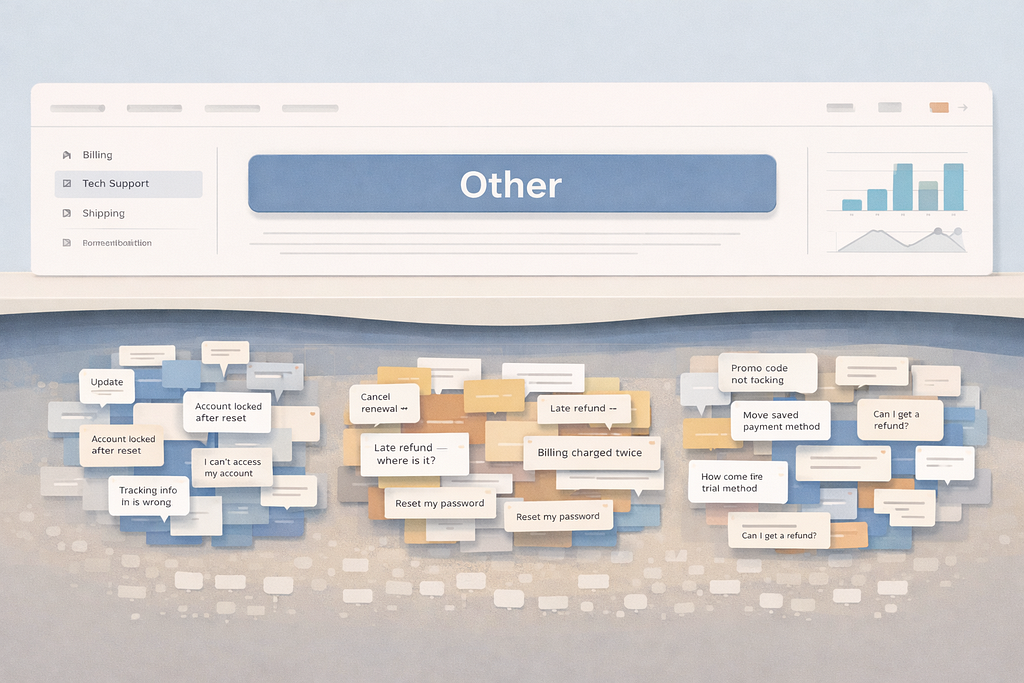
Most centers measure what they can tag. Clustering shows the repeat issues hiding inside “Other,” free-text notes, and long-tail chats.
TL;DR
- Start with real text: chat transcripts, email subjects, case descriptions, and agent notes. “Other” is usually where the value hides.
- Cluster to discover themes, then name intents in plain language that matches how customers speak.
- Quantify each intent with volume, minutes per contact, recontact rate, and misroute rate before you debate fixes.
- Treat clusters as a weekly signal, not a one-time project, so new demand shows up early.
- Build a tight loop from cluster → owner → fix → measurement, or the work becomes another report nobody uses.
Intent clustering reveals hidden demand you are already paying for
Most support operations report on what they can tag. That sounds obvious, but the implication is brutal. If the taxonomy is wrong, the reporting is wrong. If the reporting is wrong, the roadmap is wrong. Meanwhile the work still happens.
This is how teams end up surprised by demand they have handled for months. Agents talk about it. Team leads see it in the queue. Customers mention it in surveys. The dashboards show “Other,” “General,” or a catch-all bucket that never changes.
Intent clustering is the simplest way to close that gap. It groups real customer phrases into themes, even when the customer uses different words and your categories do not fit. It is not magic. It is disciplined text work that turns free-form demand into a short list of repeatable intents you can measure.
Done well, intent clustering does three things at once.
It finds the queries you do not know you are handling. It shows which of those queries are big enough to matter. Then it tells you where to fix the system so the demand drops, routes better, or resolves faster.
None of this requires a grand data program. It does require good hygiene: clean inputs, consistent sampling, and a way to tie clusters to action.
Build a demand view from the text you already collect
Most teams already have the raw material. They just do not use it in a structured way.
Common sources that work well:
- Chat transcripts (usually the cleanest starting point)
- Email subject lines plus first paragraph
- Ticket titles and descriptions
- Post-call summaries and disposition notes
- Search terms from your help center or internal knowledge base
- Transfer notes between teams
The best first source is often chat, because customers type what they want in their own words. Email can be strong too, especially subject lines. Call transcripts can be useful, but they add noise if you do not have clean speech-to-text. Agent notes can work if the notes are consistent and not just “customer called.”
A simple working assumption keeps you honest early: the data is messy, and you will not fix all of it. Your job is to make it useful enough to spot repeat themes. That starts with basic cleanup.
Basic cleanup that is worth doing:
- Remove greetings and sign-offs (“hi,” “thanks,” “kind regards”)
- Strip ticket boilerplate and legal footer text
- Normalize obvious variants (order #, order no., order number)
- Remove long account numbers and IDs so they do not dominate clusters
- Keep time stamps and channel separate from the text body
Teams sometimes try to do deep cleanup. It rarely pays off at the start. It is better to get to a first set of clusters quickly, then improve the cleanup based on what breaks.
This is where the first real win shows up. Once you look at the raw text in one place, you often see demand patterns that never make it into formal categories. The system made it hard to classify, so it never got counted.
Create clusters that reflect demand, not your org chart
Clustering is a means, not the end. The end is a demand map that matches customer language and can be acted on.
There are two common failure modes.
The first is building clusters that mirror internal teams. “Billing,” “Tech,” “Accounts.” That is routing, not intent. Customers do not think in org charts. They think in outcomes.
The second is building clusters that are too granular. A pile of tiny clusters creates busywork and no decisions.
A practical middle ground is to target intents that are:
- Specific enough that a frontline agent knows the next step
- Broad enough that the intent appears every week
- Stable enough that it does not change name every month
Examples of good intents:
- “Update delivery address after ordering”
- “Cancel renewal that already billed”
- “Reset password without access to old phone”
- “Refund delayed beyond promised window”
- “Promo code rejected at checkout”
These are outcomes. They are also testable. You can look for them, measure them, and design a fix.
This is also where teams discover the work they did not know they were handling. It is often not brand new. It is often a known pain that never had a clean tag, so it lived inside “General question.”
When you see it as a cluster with volume, it stops being a vague complaint and becomes operational demand.
Turn clusters into intents your reporting can actually use
Clustering produces groups. Reporting needs labels.
This step matters more than most teams expect. If you label intents with internal jargon, adoption dies. If you label them too broadly, you lose meaning.
A steady way to label intents is to write them as:
verb + object + constraint, in customer language.
- “Change shipping address after checkout”
- “Remove saved payment method”
- “Dispute late fee on last invoice”
- “Replace damaged item delivered yesterday”
- “Access account after phone number change”
Then you map each intent to:
- existing tags that partially cover it
- the queue that currently handles it
- the best owning team for fixes (product, policy, ops, or support enablement)
- the likely resolution path (self-serve, agent assist, specialist, or back office)
This mapping is where you learn how much hidden work you have. It is normal to find intents that are handled across three queues with three different scripts. That is not a people problem. That is a visibility problem.
When the intent becomes a named, trackable item, you can clean up routing and knowledge. You can also stop arguing about who owns it. Ownership becomes a decision, not an accident.
Quantify “unknown demand” in a way finance teams trust
Leaders respond to scale, risk, and wasted effort. Intent clustering can sound qualitative unless you quantify it.
You can quantify it with four measures that most centers can compute:
- Volume: contacts per week for the intent
- Effort: average handling minutes for the intent
- Recontact: percent of customers contacting again within X days for the same intent
- Misroute: percent of contacts that transfer or bounce before resolution
Then you convert it into time and cost. It does not need to be perfect. It needs to be directionally sound.
Calculation 1: the cost of “Other” that is actually one intent
Assume your cluster work finds that “Change shipping address after checkout” is hiding inside “Other.”
Inputs:
- 1,200 contacts per week for this intent (across chat, email, phone)
- Average handling time: 7.5 minutes
- Fully loaded cost per agent hour: £24
Step-by-step:
- Total minutes per week = 1,200 × 7.5 = 9,000 minutes
- Total hours per week = 9,000 ÷ 60 = 150 hours
- Weekly cost equivalent = 150 × 24 = £3,600
- Annual cost equivalent (52 weeks) = 3,600 × 52 = £187,200
Now you have a number that supports action. That number does not assume headcount reduction. It simply states the effort you are already paying for.
It also helps prioritize fixes. If a self-serve flow could cut handling time from 7.5 minutes to 2 minutes for half of cases, you can estimate the capacity reclaimed.
Calculation 2: capacity reclaimed from a better first-time route
Assume:
- Volume: 1,200 contacts/week
- Current transfer rate: 35%
- Transfers add 4 minutes of total time (re-explaining, waiting, re-auth)
- A routing fix can cut transfers to 15%
Step-by-step:
- Current transfers = 1,200 × 0.35 = 420 transfers/week
- New transfers = 1,200 × 0.15 = 180 transfers/week
- Transfers avoided = 420 − 180 = 240/week
- Minutes saved = 240 × 4 = 960 minutes/week
- Hours saved = 960 ÷ 60 = 16 hours/week
Sixteen hours per week is meaningful. It is also a clean story: not a training lecture, a routing correction tied to a discovered intent.
Calculation 3: sampling size that gives you confidence without boiling the ocean
Teams often get stuck thinking they need every contact clustered. You do not. You need enough to find stable patterns.
If you want to estimate the share of contacts that fall into “unknown” intents with a margin of error, you can use a simple sample size rule of thumb.
For a proportion estimate at 95% confidence and ±5% margin of error, the common approximation is:
- n ≈ 385 (when you do not know the true proportion)
That means reviewing and clustering around 400 contacts from a channel can give you a reasonable baseline on how much demand sits outside your current taxonomy. If you want ±3%, the sample climbs, but 400 is often enough for a first pass.
Many teams can tag 400 contacts in a couple of hours if they do it as a focused working session. Once you have the baseline, you can maintain the signal with smaller weekly samples, like 100 per week per channel, depending on volume.
The point is not statistical purity. The point is to escape debates based on anecdotes.
Use intent clustering to find what self-serve search is failing to answer
Support demand is often created by gaps in self-serve. Your help center search terms are a free diagnostic.
When customers search your help site for “change delivery address” and then contact support, that is a strong signal that:
- the content is missing,
- the content exists but is hard to find,
- or the policy is too strict and forces contact.
Pairing clusters from contact text with help center searches tightens your diagnosis. When both signals point to the same intent, you can act with confidence.
This is also where teams spot a quiet truth: sometimes the content is fine, but the product flow is broken. Customers look for instructions because the UI did not guide them. The fix belongs in the product, not the help center.
Clustering keeps you honest because it reflects what customers actually asked, not what you hoped they would do.
Reduce operational noise by fixing the top three cluster types first
After the first clustering run, the list can feel long. Ten, twenty, fifty intents. The best move is to sort them into three buckets based on what it takes to remove work.
- Fixable with content and routing
- These are intents where the policy is clear and the steps are stable. The center just needs:
- the right article
- the right macro
- the right queue
- and a short script that matches the intent
These are good early wins because they reduce misroutes and handle time fast.
- Fixable with small product or policy changes
- These are intents created by confusing UI, missing status visibility, or a policy edge case that forces contact. Examples include:
- “Where is my refund”
- “Why did my trial convert”
- “I cannot log in after phone change”
These often drive repeats. Even a small fix can drop contacts.
- Not ready yet because the rules are unclear
- Some intents surface real ambiguity. Different agents give different answers because the rules are genuinely unclear. Automating around this makes it worse. The correct move is to force a decision: define the rule, publish it, then revisit.
Teams that sequence well start with bucket one, take a couple from bucket two with clear owners, and park bucket three until the policy is resolved. That is how you keep the program credible.
Establish a weekly loop so new demand shows up early
One-off clustering projects create a slide deck. They rarely change operations.
The value comes when you treat clustering as a weekly signal. Demand shifts. Promotions launch. Bugs appear. Policy changes. If you only look twice a year, you learn about shifts after the queue breaks.
A simple weekly loop works:
- Pull a fresh sample per channel (for high volume, 100–300 contacts can be enough).
- Run the same clustering method or a lightweight classification pass against existing intents.
- Flag three things:
- a new cluster above a threshold (emerging intent)
- a known intent with rising volume (something broke)
- a known intent with rising handle time or recontact (process friction)
Then do one short review with owners who can act. Keep it to 30 minutes. The output is a small backlog:
- one routing change
- one knowledge change
- one investigation ticket
- one policy decision request
If you create ten tickets every week, the loop collapses. If you create none, the loop becomes theatre.
This loop also helps after releases. When a product update goes out, emerging intents will show up in text within days. Clustering catches it before your category reporting catches it, because category reporting often lags behind changes.
Keep the work safe: avoid turning clustering into agent surveillance
There is a line teams cross without meaning to. They start by clustering to find process gaps. Then they drift into using it to grade individual agents’ phrasing. That undermines trust and stops people from writing useful notes.
Clustering should focus on demand, not on people. The unit of value is the intent and the path to resolution.
A healthy stance is to separate:
- agent coaching (handled by QA with clear rules)
- demand discovery (handled by ops and enablement)
This separation also keeps the data cleaner. Agents will write better summaries when they believe the purpose is to fix the system, not catch mistakes.
When coaching is needed, intent clustering can still help by showing where the knowledge base is unclear or the macros are wrong. That is coaching the system first.
Make taxonomy changes without breaking reporting
Teams often fear changing categories because it breaks trend lines. That fear is valid. It is also manageable.
A good approach is to treat taxonomy as versioned.
- Keep the old categories for a defined period.
- Introduce new intents as a parallel tag or sub-tag.
- Build a mapping table from old to new.
- Report both views during the transition.
- After adoption stabilizes, retire the old ones.
This way you improve visibility without losing history. You also avoid the common trap of adding ten new categories at once and getting inconsistent tagging.
Intent clustering helps here because it tells you which new categories are worth adding. You add categories where you have evidence of repeat volume, not where someone had a strong opinion in a meeting.
Tie each intent to the right kind of fix
One reason “unknown demand” persists is that teams try the wrong fix.
- If the issue is misroute, the fix is routing and entry questions.
- If the issue is confusion, the fix is clearer content and clearer UI cues.
- If the issue is missing status, the fix is proactive updates and tracking visibility.
- If the issue is policy friction, the fix is a policy decision with tradeoffs stated.
- If the issue is true defect, the fix is engineering work, plus a temporary workaround script.
Clustering helps you choose correctly because it shows the language customers use. When customers say “I was charged twice,” that is different from “I don’t recognize this charge,” even if both land in “Billing.”
Those differences matter for routing, scripts, and who owns the fix.
A practical example of what teams usually discover
When intent clustering is done honestly, three discoveries show up often.
First, “Other” is not random. It is usually ten real intents that were never named. Agents handled them anyway, one case at a time, without a shared script.
Second, misroutes are often caused by entry labels and menu wording, not agent choice. Customers choose the closest thing. If the menu does not match their language, they will land in the wrong place. Clustering gives you their language.
Third, a handful of intents drive a lot of repeat contacts because the system does not give customers a stable status signal. Refund timing and delivery timing are classic examples. Customers contact again because they cannot see progress. Fixing visibility can drop volume more than any macro.
None of this requires a grand reorg. It requires treating customer text as operational data.
Keep the tone practical when teams ask the common questions
Teams usually ask how to start without rebuilding everything. The answer is to keep the first run narrow: one channel, four weeks of data, one clustering pass, and five to ten named intents. Then run the weekly loop and add intent coverage gradually.
Teams also ask whether clustering replaces tagging. It does not. Tagging is still needed for consistent reporting and routing. Clustering is how you improve the tags so they reflect reality.
Teams often worry about edge cases and sarcasm in text. Those exist. They do not block progress. Most volume comes from straightforward requests. The long tail can remain in “Other” without harm as long as the top hidden intents are named and tracked.
Teams also ask who should own the work. The most stable ownership model is shared: ops owns the cadence and measurement, enablement owns knowledge and macros, and product or policy owners take the fixes that actually remove contacts. Without that split, clustering becomes another report.
Intent clustering is a demand discovery method. It shows the real questions customers asked, in the words they used, across channels and time. It also exposes the work your team already does but cannot measure, which is why it never gets fixed.
When you build a simple weekly loop around it, you stop learning about new demand through escalations and queue spikes. You learn through data you already have. Then you can decide what to fix, what to route better, and what to leave alone.
The best outcome is not a prettier dashboard. The best outcome is fewer surprises, fewer repeats, and fewer hours spent handling the same “unknown” problem over and over, just because nobody named it.
Intent Clustering: Finding the Work Your Support Team Handles but Never Tracks was originally published in GZP Blog on Medium, where people are continuing the conversation by highlighting and responding to this story.