The Cost of Quiet Seconds: How Pauses on Calls Add Up to Real Headcount
A GZP approach to reduce delays and repeats.
Ten seconds per call becomes hours per day at scale. Track silence by call type, then remove the drivers that create it.
TL;DR
- Track silence like a real metric, with a simple “silence budget” by call type and channel.
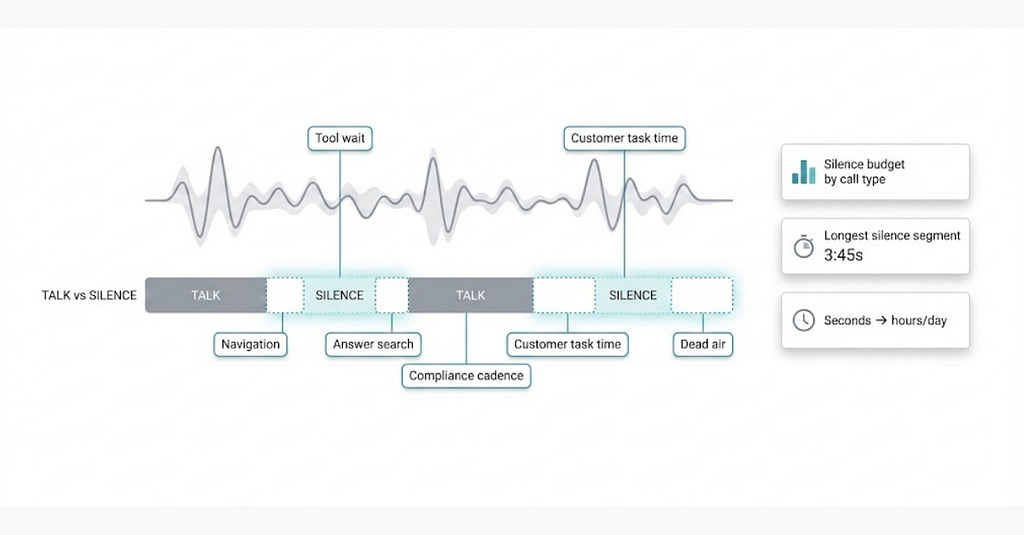
- Split silence into practical types so you can tie it to a step: tool wait, navigation, answer search, compliance cadence, customer task time, and dead air.
- Convert silence seconds into capacity and cost so leaders act on it.
- Use silence trends as a change detector after releases, policy updates, and routing changes.
- Fix the big three first: slow tools, hard-to-find answers, and messy transfers.
Silence is not empty time in a contact center. It is work that no one can see.
A caller hears a pause and feels the line has stalled. An agent hears the same pause and is often doing real work, like finding a policy, waiting for a screen, or typing notes. A supervisor hears it later and sees handle time climb. Each view is true, and that is the point. Silence sits between steps, so it highlights where the process slows down.
Most centers already track hold time. That helps, but it is not enough. Hold is an event the system logs. Silence is often inside “talk time,” so it stays hidden. Agents also learn fast that hold looks bad on a scorecard. Many will avoid it and work in quiet instead. The customer still waits, but now the wait does not show up as hold. If you only track holds, you will miss a large part of friction.
Treating silence as data is not about forcing agents to chatter. It is about making invisible delays visible, then removing the ones the business caused. When you fix the process, agents talk less and solve more. Customers feel the difference right away.
Silence tells you where the process is sticking
Silence is one of the few signals that does not require a lot of interpretation. If nobody is speaking, something is happening off-mic. Sometimes that “something” is needed. Often it is a workaround.
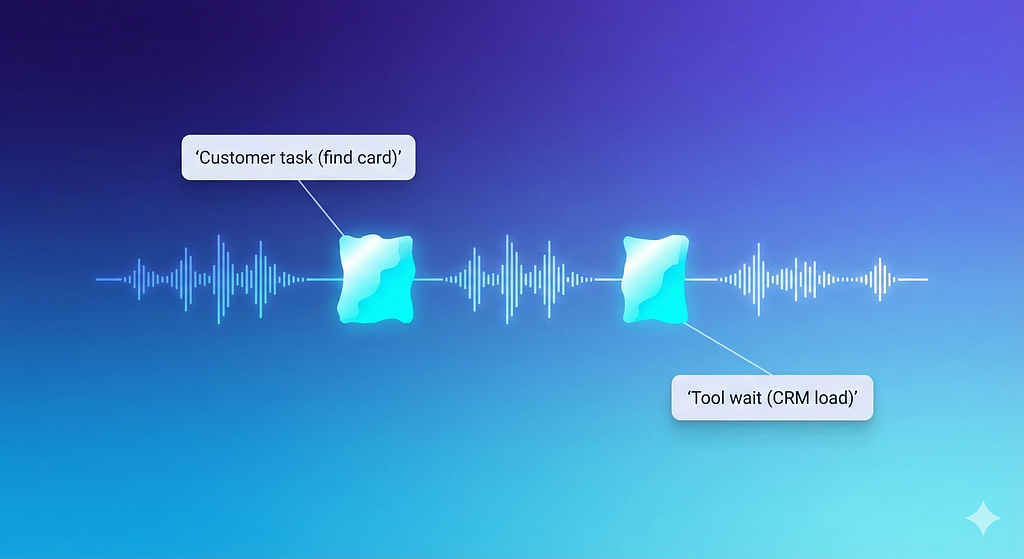
The useful move is to stop debating whether silence is good or bad and start measuring what kind of silence it is. A pause while a customer finds a bank card is different from a pause while an agent waits for a CRM page to load. The first might be reduced with better pre-call messaging. The second is usually a system or design issue.
A steady way to work with this is to start with a plain definition: silence is any stretch where neither party speaks, excluding known audio like IVR prompts. That definition will not be perfect. Voice detection can miss soft speech. Background noise can confuse it. You can still get value with sampling, trend lines, and consistent rules. Perfection is not required for the first round. Stability is.
You can also sanity-check the data by listening to a small sample each week. Ten calls per call type is often enough to spot whether the tool is measuring something real. When the sample and the metric match, you can trust the trend, even if the exact seconds are off.
The practical test is simple. If a change in tools or policy increases silence by three seconds per call for a call type, you will feel it in service level and handle time. That is true even if the baseline is not exact.
A taxonomy that maps pauses to steps
Teams get stuck when they treat silence as one bucket. The fix is to split it into types that point to different root causes. You can start with six. Most centers can use these without a big analytics program.
1. Tool wait
This is silence caused by the system, not the person. It shows up around customer lookup, case creation, refunds, address changes, and wrap-up. The agent is ready to speak, but the screen is not ready.
You can often verify tool wait by matching silent segments to timestamps for app launches, page loads, and API calls if your desktop tooling captures them. If you do not have that data, you can still catch it by listening. Tool wait silence tends to be short and repeated. You hear a click, then quiet, then another click.
2. Navigation
This is different from tool wait. The system might be fast, but the agent is moving through too many screens. The pause is longer and less repetitive. It often follows the agent saying they will “check” something, then going quiet while they hunt.
Navigation silence is common when the workflow is built for the back office and then pushed into the front line. The number of screens is a design choice, and design choices show up as silence.
3. Answer search
This is knowledge base time, policy time, and “what am I allowed to do” time. You often hear the agent restart the conversation after the pause with uncertainty. Or you hear the same question asked twice because they are trying to confirm.
When policies change quickly, answer search silence tends to spike. That is not a mystery. People pause when they do not trust the answer in front of them.
4. Compliance cadence
Some scripts create stop-start calls. The agent reads a required line. The customer reacts. The agent pauses to find the next required line or to handle objections. The pauses are not always long, but they break the flow.
This is not an argument against compliance. It is an argument for writing scripts that fit spoken language and placing them in the call where they do the least harm.
5. Customer task time
This is silence while the customer finds a code, opens an email, reboots a modem, or looks up a number. This kind of silence can be normal. It can also signal that you ask for things at the wrong time.
If you want to reduce customer task silence, you often start before the call even starts. A short message in the IVR or a confirmation text can make the customer ready.
6.Dead air
Dead air is the most dangerous type. It is silence with no hold music and no reassurance. Customers interpret it as confusion or abandonment. It shows up in softphone glitches, transfers, muted headsets, and broken conference calls. Even a small dead air rate can drive repeat calls and complaints.
You do not need a perfect classifier for these six types. A human tagging pass on a sample can be enough to guide fixes. Over time, you can automate more of it, but the first gains usually come from basic hygiene.
Set a silence budget that fits the work
A “silence budget” is the amount of quiet time you accept in a call before you treat it as friction. It is like an error budget in engineering. You do not aim for zero. You aim for reasonable, then you watch for drift.
Silence budgets need to be set by call type and channel. A password reset call has a different shape than a billing dispute. Chat has different pauses than voice. Even within voice, a collections call and a tech support call do not behave the same.
A simple starting point is to pick three high-volume call types and create a baseline.
Example baselines (illustrative only):
- Password reset: 20–30 seconds total silence per call
- Billing dispute: 40–60 seconds
- Cancellation: 30–45 seconds
The point of a range is to avoid punishing normal variation. Some customers will always need more time. Some cases will always be complex. A range lets you spot systematic shifts instead of chasing outliers.
Once you have a baseline, set a first target that is modest. Ten percent is often enough to prove the method. If you aim for a 40 percent cut on day one, teams will game it. They will talk over the customer task time. They will avoid documenting. They will do the work later. That looks good on a dashboard and breaks later in the week.
A good silence budget also fits the customer experience. Long pauses feel worse than short ones, even if the total time is the same. Two five-second pauses are easier to tolerate than one ten-second gap with no context. That is why you should track both total silence and “longest silence segment.” Longest segment is a strong predictor of complaint tone.
Turn seconds of silence into capacity and cost
Leaders move when they can see scale. Silence becomes real when you turn it into agent-hours, staffing, and money. This does not mean you will “save” all of it. It means you can size the prize and decide where to invest.
Total silent hours per day
Assume:
- 12,000 calls per day
- Average silence per call: 18 seconds
Step-by-step:
- Total silence seconds = 12,000 × 18 = 216,000 seconds
- Total silence hours = 216,000 ÷ 3,600 = 60 hours
That is 60 hours of quiet time per day across the operation.
If fully loaded agent cost is £22 per hour:
- Daily cost equivalent = 60 × 22 = £1,320 per day
- Annual cost equivalent (250 days) = 1,320 × 250 = £330,000 per year
Not all silence is removable. Customer task time is real. Some compliance cadence is required. A realistic working assumption for early work is that half is addressable once you fix tool wait, knowledge clarity, and transfer hygiene. If you apply that:
Addressable annual cost equivalent ≈ £165,000
That number is useful because it frames the effort. It tells you whether to treat this as a small improvement project or a core operating initiative.
Capacity gained from removing 10 seconds per call
Assume:
- AHT: 360 seconds per call
- Reduce silence by 10 seconds per call
- Calls per day: 12,000
Step-by-step:
- Time saved per day = 12,000 × 10 = 120,000 seconds
- Hours saved per day = 120,000 ÷ 3,600 = 33.33 hours
Translate to agent-days. If each agent has 6.5 productive hours per day after shrinkage:
- Agent-days of capacity = 33.33 ÷ 6.5 ≈ 5.13 agent-days
That is five agents worth of daily capacity. You might use it to improve service level, reduce overtime, or absorb demand spikes. Even if you do not reduce headcount, that capacity is real.
The cost of one extra second of silence
This is a useful back-pocket metric for change reviews.
Assume:
- Calls per month: 300,000
- One extra second of silence per call
Step-by-step:
- Extra seconds per month = 300,000 × 1 = 300,000 seconds
- Extra hours per month = 300,000 ÷ 3,600 ≈ 83.33 hours
If cost is £22 per hour:
- Monthly cost equivalent = 83.33 × 22 ≈ £1,833
One second sounds tiny. At scale, it is not.
This is why silence is a good change detector. A small shift can carry real cost.
Instrument silence with what you already have
Some teams think silence analysis requires an advanced stack. It helps, but it is not required to start.
Most centers already have:
- Call recordings
- Hold and transfer logs
- ACD time stamps
- Basic QA sampling
- Sometimes desktop analytics or app event logs
You can do a first-pass program with those inputs.
Start by adding two fields to QA scoring or to a separate tag sheet:
- Total silence estimate (rough is fine at first)
- Primary silence driver (tool wait, navigation, answer search, compliance cadence, customer task, dead air)
Do this on a small sample, weekly. Track it by call type. After four weeks, you will see patterns. After eight, you will see trends.
If you have speech analytics, you can automate detection of “no speech” intervals. If you do not, you can still get value with human sampling and basic timing. The key is consistency.
Also, connect silence to a process step. It is not enough to say “this call had 40 seconds of silence.” You want to say “this call had 18 seconds of tool wait during refund submission.” That points to a fix.
Once you have that mapping, you can test improvements. If a tool release reduced refund submission wait by four seconds, silence should fall in that slice. If it did not, the release did not help, or a new step was added elsewhere.
Use silence as a change detector after releases
Contact centers change constantly. Routing tweaks, new promos, updated return rules, new billing cycles, fresh compliance scripts. Silence often spikes when the change is not supported by training, knowledge updates, or stable tools.
A workable governance loop is simple:
- Produce a weekly silence trend by call type.
- Flag any move above a threshold, like +3 seconds per call week over week.
- Match the spike to a change log. Tool release, policy change, script update, or routing change.
- Pull ten calls from that slice and tag the silence type and the step.
- File one root cause record and one fix ticket.
The discipline is “one spike, one fix.” If you try to fix twelve things at once, nothing gets fixed. If the change log is messy, clean it. You cannot run this loop without a clear record of what changed and when.
This approach also answers a common executive question in a calm way. Leaders ask why handle time rose last week. Instead of arguing about agent effort, you can show that silence increased in one call type right after a billing policy update, and that most of the new silence is answer search. That is a knowledge issue. Now you have a fix path.
Fix the big drivers first: tools, knowledge, transfers, and scripts
Silence tends to come from boring sources. That is good. Boring problems are often fixable.
Tool wait and screen sprawl
If an agent needs four systems to complete one task, they will go quiet. Even fast systems create pauses when the workflow is fragmented. Each switch costs attention and time.
You can measure this without fancy tools. Pick the top call type. Map the “happy path” steps. Then time them with a stopwatch using a standard agent login on a standard machine. Include the real time to load screens. Include the time to find the right tab. Include the time to correct errors.
This timing exercise often surprises people. Vendor dashboards measure server response time. Agents live in full path time. Full path time is what customers feel.
A practical target is to remove one screen or one re-entry step per quarter in the highest-volume flows. It does not sound dramatic, but it adds up. Removing one step can cut navigation silence and reduce errors.
Knowledge clarity and version drift
Agents pause when they do not trust the answer. The friction is not the reading. It is the uncertainty. If the knowledge base returns ten similar articles with different dates, the agent will hunt. If training says one thing and the article says another, the agent will hunt longer.
The fix is not more content. It is fewer, clearer answers.
A simple metric here is “articles opened per answer.” If agents open two or three articles before answering a common question, your content is not doing its job.
Also watch what happens after policy changes. Silence can jump the same day the policy changes if the article is late or unclear. That is a process failure. Policy, training, and knowledge need one release calendar, not three.
Transfers and handoffs
Transfers create silence during handoff and they often add repeated verification. Customers experience this as stalling, even if the internal handoff is correct.
Two practical fixes reduce silence fast:
- Reduce transfers by tightening the call type definition and routing.
- When transfers are needed, send a structured handoff note that includes intent, key facts, and what the customer already did.
The handoff note sounds basic. It works. It reduces the time the next agent spends orienting, which reduces dead air and navigation silence right after the transfer.
If you want a clean measure, track “silence in the first 30 seconds after transfer.” When that number drops, customers feel the handoff is smoother, even if the total handle time only drops a little.
Compliance scripts that interrupt flow
Compliance can be done in a way that does not create stop-start calls. The script itself might be required, but the placement and phrasing are often flexible.
Two moves help:
- Place required disclosures at a stable moment, not at the peak of emotion.
- Write the script as spoken language, not legal text, while keeping required meaning.
When scripts are hard to read, agents pause.
They look for the next line.
They restart.
Silence rises.
Customers also interrupt, which adds more restarts.
A smoother script reduces silence and improves accuracy.
Coach for presence, not chatter
Silence analysis can become a weapon if leaders use it to blame agents for being quiet. That breaks trust. It also misses the root cause.
A better stance is to coach presence. Presence is short, clear narration that tells the customer what is happening, then gets back to work.
One sentence is enough:
“I’m opening your account now. This may take a few seconds.”
“I’m pulling up the policy so I quote it correctly.”
“I’m submitting the refund. You may hear a short pause while it processes.”
This keeps the customer oriented. It does not inflate talk time with filler. It also reduces the emotional cost of tool wait. The wait is the same, but it feels different when it is explained.
This coaching works best after you fix the system issues. If the tool is genuinely slow, narration helps, but it does not solve the cost. If the knowledge base is messy, narration reduces discomfort but it does not reduce the search. Use coaching to protect the experience while process work catches up, not as a substitute for process work.
How this fits common objections and practical constraints
Some teams worry that measuring silence will push agents to talk over customers. That risk is real if the metric is used without context. It is also avoidable.
The rule that keeps this safe is to treat silence as a process metric first. Report it by call type, by step, and by tool. Do not rank agents on silence. If you must look at agent-level data, use it for support and coaching, not scoring.
Another concern is that silence is not always friction. That is true. Customers need time. Agents need time to type. A silence budget and a taxonomy solve this. You do not target customer task time the same way you target tool wait. You also focus on long silence segments and dead air, because those are the ones that damage trust.
There is also the question of how this relates to handle time. Silence reduction often reduces AHT, but not always. Sometimes a change reduces silence and increases talk time because the agent explains better. That can still be a win if it reduces repeats and complaints. That is why you should review silence alongside repeat rate, transfers, and customer sentiment tags. One metric alone will mislead you.
Silence analysis works because it is grounded in what customers feel and what agents do. It makes friction visible without needing a debate about effort. When you treat silence as process data, you stop guessing. You start removing the steps that slow everyone down.
The Cost of Quiet Seconds: How Pauses on Calls Add Up to Real Headcount was originally published in GZP Blog on Medium, where people are continuing the conversation by highlighting and responding to this story.